Case study · 2025
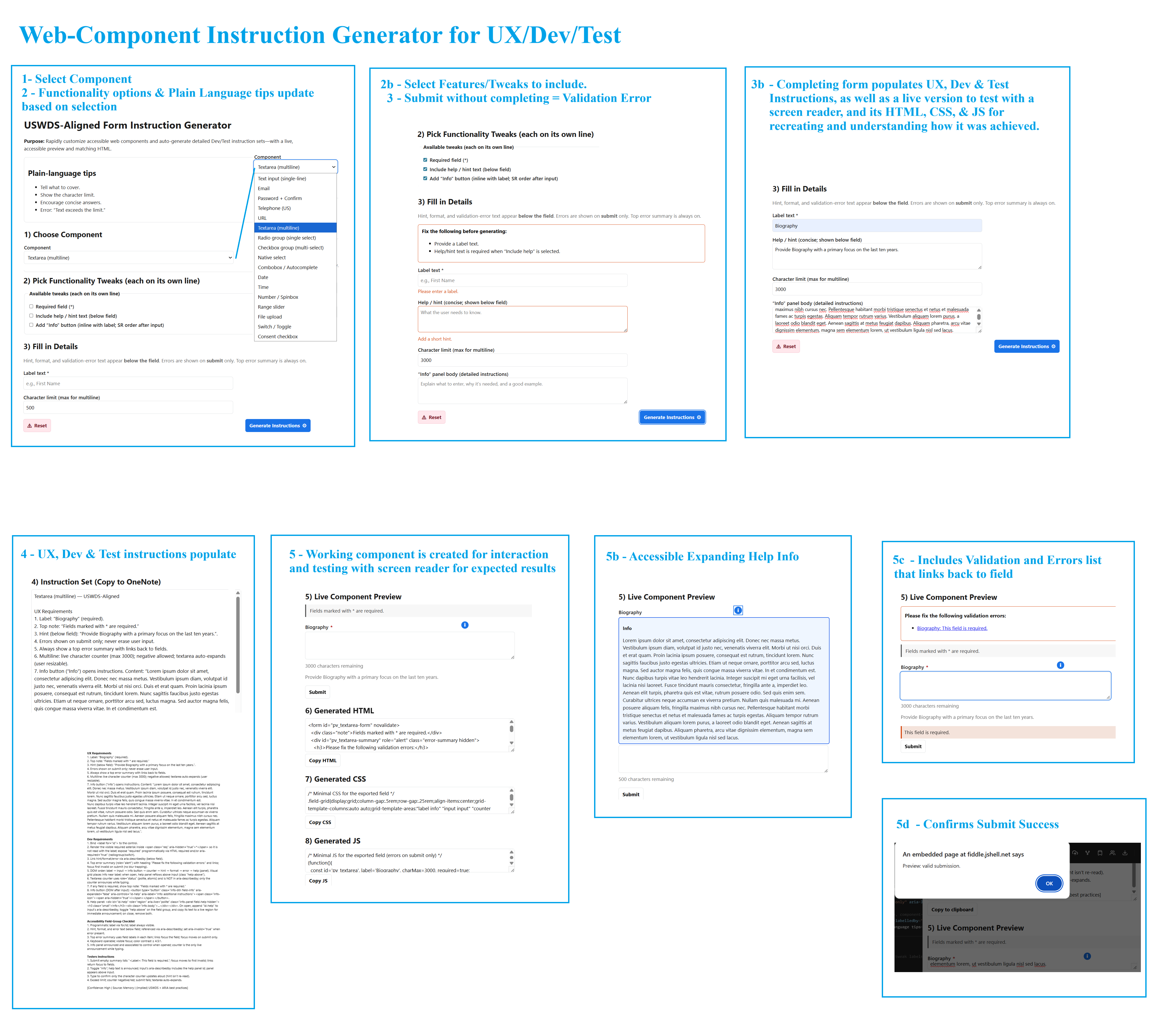
Accessible Form Component & UX Requirements Generator
A working generator that aligns accessible form previews, semantic HTML, UX requirements, development guidance, and test expectations.
- Client
- U.S. Navy
- Role
- Product Design, HCD/UX, and Accessibility Lead
- Governance
- Section 508 and WCAG accessibility requirements, informed by USWDS form conventions and cross-disciplinary handoff needs
What I made
One source of truth for accessible form patterns
- A form-component generator with a live preview.
- Semantic HTML output for the selected field pattern.
- Concise, aligned UX, accessibility, development, and test guidance.
My role
Product design, content, and accessibility behavior
- Led Product Design, HCD/UX, and accessibility.
- Wrote plain-language patterns for labels, hints, instructions, and errors.
- Defined semantic markup, ARIA relationships, keyboard behavior, validation, and testing rules.
Why it helps
Faster handoffs with fewer accessibility gaps
- Faster, more consistent form design across teams.
- Fewer accessibility defects involving labels, errors, hints, and focus.
- Clearer handoffs because UX text, development specifications, and test steps describe the same pattern.
Accessibility highlights
Accessibility behavior shared across components
- Always-visible labels; placeholders are never used as labels.
- Required indicators are visually present without polluting the accessible name, while the control still announces its required state.
- Hint, format, and error text appears below the field and is associated programmatically.
- Validation occurs on submit to avoid error messages while someone is still typing.
- The top error summary uses the field label and links back to the invalid field.
- Optional detailed instructions remain user-controlled and associated with the relevant field.
- Multiline fields provide a live character counter without repeatedly announcing static instructions.
Results
A shared pattern for UX, development, and testing
- Teams can generate accessible field patterns in minutes.
- UX, development, and testing guidance derives from the same configuration.
- Aligned handoffs reduce ambiguity and accessibility rework.
What’s next
Expand and validate the pattern library
- Ready-made presets such as constrained date fields.
- Optional USWDS token and class variants.
- Generated validator unit tests.
- Broader assistive-technology testing notes.
- Advanced scripted behavior and complete CSS/JavaScript export.